Merchant notes by the teammate, to-do's with sub-issues, and Activity by day
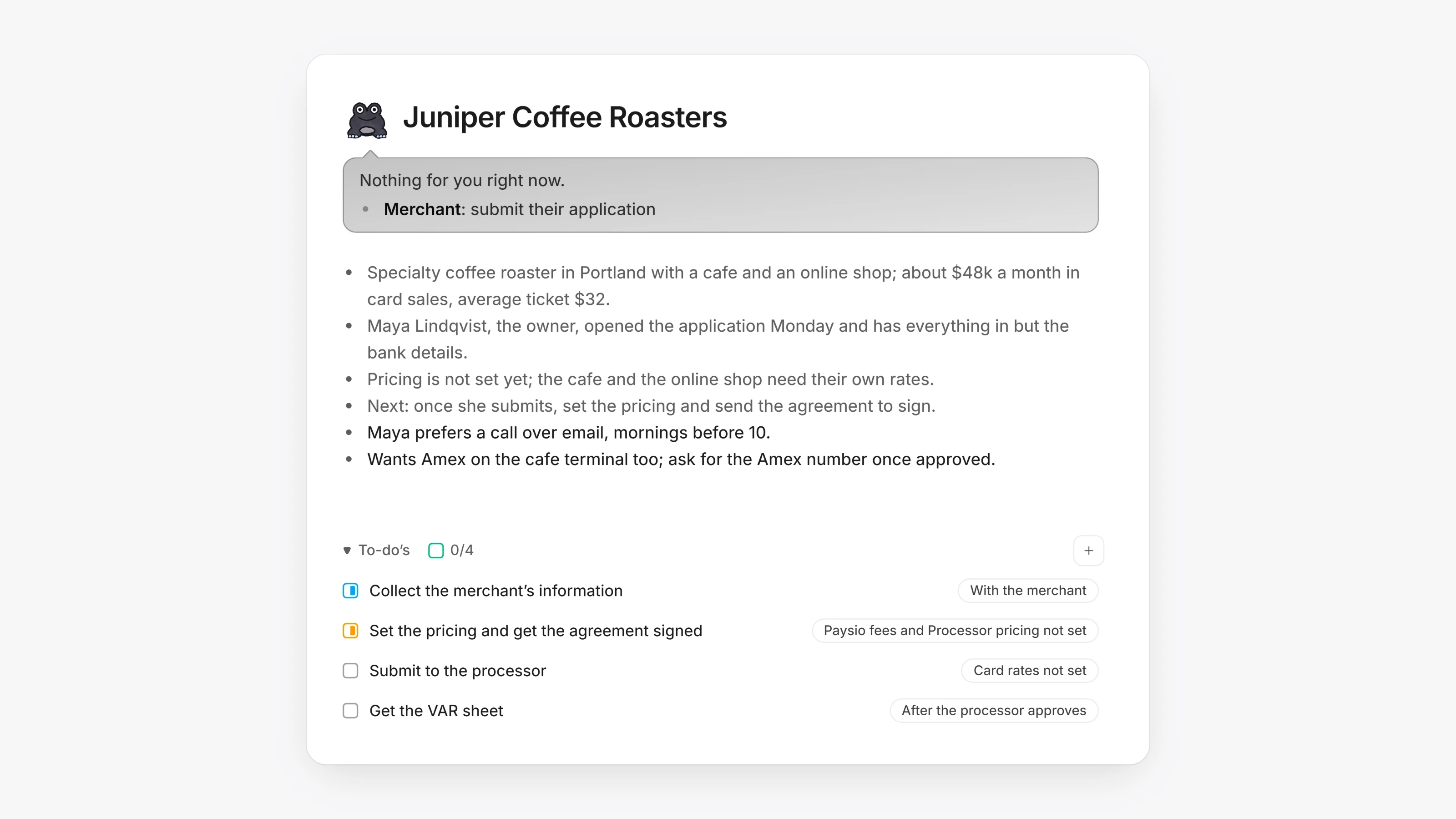
In the Agent Dashboard, the teammate now writes each merchant's notes for you: where each processor stands, the pricing, and what is holding things up. They sit in the same notes editor your team uses, so anyone can edit them. A line you write or change becomes yours, and the teammate keeps your words when it updates the rest.
To-do's are fewer, and each one is something worth tracking. When a step involves several processors, such as submitting the application or confirming the VAR sheet, it splits into one sub-issue per processor, and the step shows how many are done, for example 2/3. Each sub-issue has its own page with its Activity and Details. Every to-do keeps a current note saying who it waits on, and a finished one gets a short wrap-up of how it ended.
A merchant's Activity is now grouped by day, under Today, Yesterday and dated headers, on a cleaner timeline. The teammate's steps fold into one line you can open. The reply box shows when you hover a card or press Reply, and Enter sends your comment, with Shift + Enter for a new line.
- Onboarding emails, such as the agreement to sign, the application link and what is still missing, are written by the teammate in its own words. They go from your connected mailbox, or from Paysio's address if you have not connected one. You can edit each one, and before it is sent you confirm the From, To and Cc in one popup.
- The teammate checks a processor's VAR sheet and 3-D Secure numbers itself, against the processor's own emails. When something is missing or does not match, it emails the processor asking for exactly that fix, and says so on Activity.
- It waits for your answer when that answer could change an email, and asking it a question never sends or changes anything.
- It picks up new emails within seconds, and handles a burst of them in one go.
- A clear go ahead, such as "we've got enough, let's go", "go ahead" or "send it", lets it carry on. On a to-do's page, telling it the to-do is done closes it.
- The merchant bubble shows short step lines and clearer card titles, and stays steady while the teammate works.
- If you change a merchant's pricing after sending the apply link, the open application shows the new prices with Your pricing was just updated. Check the new prices, then sign. The merchant signs once. A change made after they signed still asks for a new signature.
- A to-do's Details show one card per item. The agreement card shows what was sent, who signs, its status and when it was signed. Chargeback alert numbers show where they came from when you hover them.
- The Merchants list has its column headers back above the one-line rows. Click a header to sort by it.
- Opening a merchant, and moving between merchants in To do, are faster.
- Empty pages and panels show their message centred.
- On a phone, a list or menu with a problem in one row now shows a short note in its place, and the rest of the page keeps working.
- Long-standing customers with a clean history are flagged less often when they pay with Apple Pay or Google Pay.
- When a bank declines a customer's card as lost or stolen and they then try a card they have never used with you, that payment now gets a closer look.