Leads, team roles and one sidebar in the Agent Dashboard, and a credit card surcharge
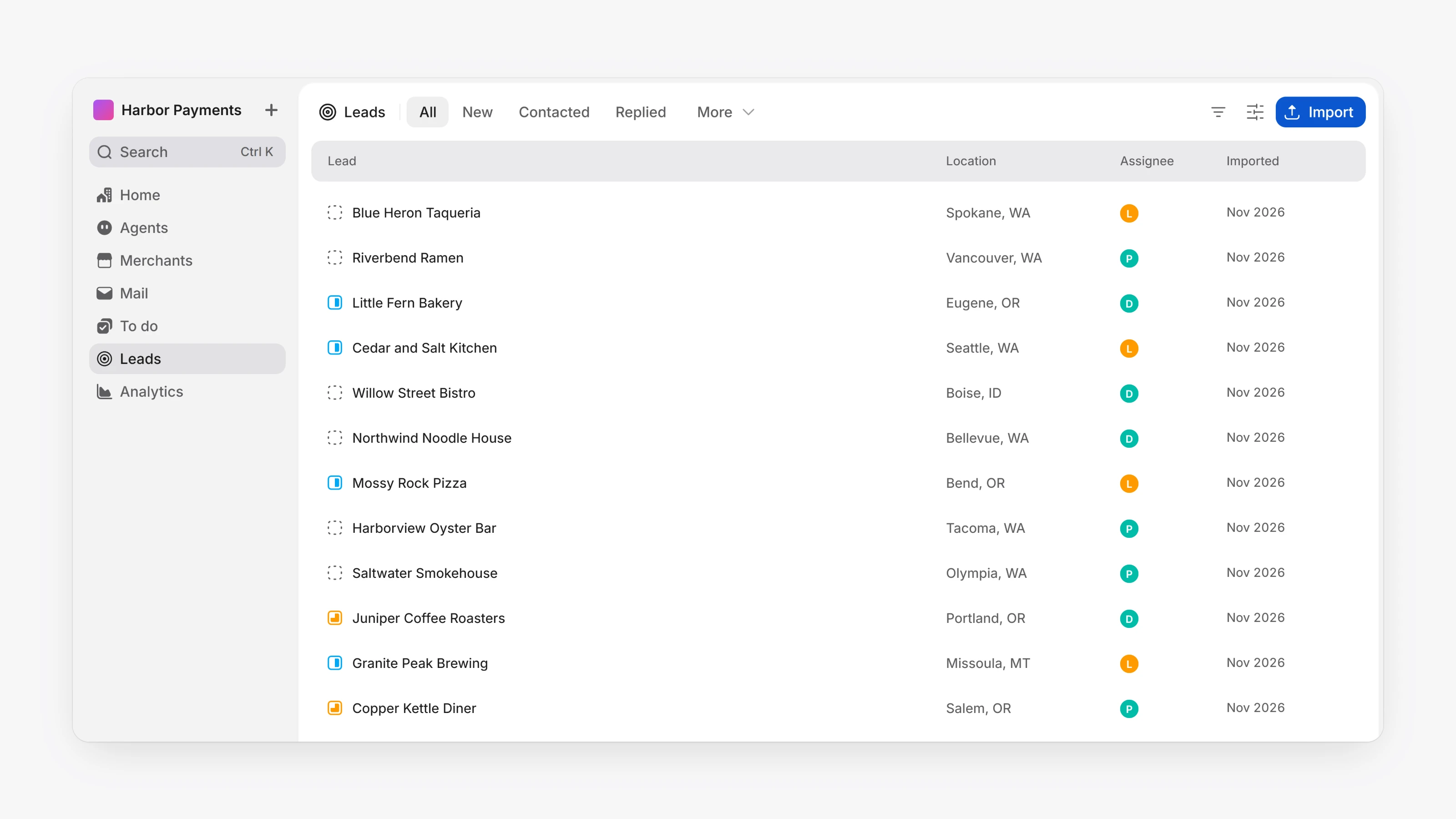
The Agent Dashboard's sidebar is now one list: Home, Agents, Merchants, Mail, To do, Leads and Analytics. Merchants opens Disputes, Risk and Reserves for your whole book, beside the logs. Analytics opens Residuals, the old Earnings page. The Simple view is gone: the dashboard now has one layout for everyone.
Leads holds the businesses from lists you buy, before they are merchants. Click Import and pick your files. A chat opens with them, reads them whatever their columns are, and asks once before importing. You can also drop files in a chat on Agents. Each lead then has a page like a merchant's, with its own teammate.
For merchants, Dual pricing in Settings, then Checkout, is now Credit card surcharge. It applies to credit cards only, up to 3%, as card network rules require. Debit and prepaid cards, cards whose type is not known, Google Pay and bank payments never pay it. If yours was set above 3%, checkout charges 3% until you change it.
- Disputes shows one row per merchant with Open, Chargebacks, At stake, Next due and Last dispute. Click a row to open that merchant's disputes in their dashboard, in a new tab.
- Risk shows each merchant's chargeback and refund ratios, and how close it is to the card networks' lines and to your own, under All, Over and Near. Its Alerts tab lists what crossed a line. Set your lines, and how many days without sales count as stopped processing, in Settings, then Risk alerts.
- Reserves shows the reserve terms your processors set for each merchant, with the balance where a processor reports one.
- These tables, Residuals and Agent payouts filter by date like the Payments table, and export the rows you tick.
- New merchant is laid out like the merchant page it becomes: the name as the title, the owner's email under it, then Processors, Documents they upload and Pricing. Create merchant opens the merchant's own page.
- In Settings, then Apply links, New apply link looks like the payment link page, with a live preview of the page applicants see. A link's own page is the same editor: change it in place and click Save.
- A merchant's Pricing reads Custom pricing once its rates differ from the template, and shows the template's name again if they match.
- An ID, a voided check, an EIN letter or articles a merchant uploads now fill their application by themselves. Hover a value to see which document it came from.
- On Fees, a merchant with several processors gets a switcher at the top right of Pricing, showing each processor's own card rates.
- In Mail, a reply that lands in a new thread joins its conversation, and Paysio's own emails can be archived like any thread. Archived is now a tab of All mail.
- In the command menu, a middle click or Ctrl or Cmd click on a result opens it in a new tab. This works in the merchant dashboard too.
- A lead's page opens like a merchant's: the teammate's face, and the bubble with its latest words and cards. Write to it on Activity.
- Each email the teammate drafts waits in the bubble for your Send.
- When the lead says yes, or you tell the teammate, a Convert card shows in the bubble. Convert makes the merchant, and the teammate drafts the application link email there for your Send. Convert to merchant is also in the "..." menu.
- A lead's emails show on the lead in Mail, and move to the merchant on Convert.
- Documents a lead emails are kept on the lead, under Documents, and carried over on Convert.
- Settings, then Members & permissions, has four roles: Owner, Manager, Agent and Viewer. A viewer sees every merchant, read only. Owners choose the pages each role opens under Page access.
- Click Invite to send someone a link to join with a role. Pending invites can be resent or revoked. Removing a member asks who takes their merchants.
- A merchant can have several assignees, shown on its Assignee row with the deal owner first. Agents see the merchants they own or are assigned to. Owners, managers and anyone on a merchant can add people.
- Owners and managers change a merchant's Deal owner from its "..." menu. Share with is gone: everyone on a merchant is now an assignee.
- In Analytics, then Agent payouts, owners see each agent's amount for the month and Publish it. Splits are set on each member's page. Agents see their own statements in Your earnings, and their pay arrives as a payout link by email, with no payout method to add.
- Every email waits for your Send, where you confirm the From, To and Cc. Saying "send it" in a chat no longer sends one, and the Application received email now waits as a card too.
- It checks and saves VAR and 3D Secure sheets itself, from your processors' emails. It never asks you to confirm them, and never asks a processor again for a number it already gave.
- It works faster: it reads new emails sooner, takes less time per step, and does not repeat a step that failed on the same facts.
- It shows one steady working state from start to finish, even when one piece of work leads to the next.
- Answering one of its cards closes the matching to-do at once.
- On a merchant's To-do’s, a processor's to-dos sit under that processor. Done to-dos are greyed, and so are finished items in To do.
- Apple Pay pays the surcharge on a credit card, and the payment sheet shows a Card surcharge line before the customer approves.
- Checkout tells customers "Credit cards include a 3% surcharge. Debit cards don't." and shows the surcharge once the card is known.
- Receipts, the confirmation page, invoices and transaction details show the surcharge as its own line, such as Card surcharge (3%). The invoice page adds Total by credit card.
- Percentage custom fees on a card follow the same rule: credit cards only, and fees plus surcharge at most 3%. Fixed fees and bank payments are unchanged.
- On an application link, Send answers saves every answer at once and waits for uploads to finish. A question left open stays there for later.
- The owner an application link was sent to can sign from it: click Sign on the row that counts signatures, such as 0 of 1 owner signed.
- Profile pictures now show for everyone on your team, everywhere, with a plain placeholder for anyone without one.
- Charts fade cleanly into the page, with no hard edges.